Demos and Rendering
Examples demonstrate API usage and scene configuration. Check --help for solver, viewer, and device options;
some scripts do not default to Style3D Sim. Run commands from the repository root.
Before Running
- Complete Installation to install the package into
.venv. - Install viewer, asset, and example dependencies with
uv sync --extra examples. - Set credentials to prevent headless programs from waiting for input.
- Allow access to asset download URLs when needed. Individual examples manage their own assets.
Common Examples
| Scene | Script | Notes |
|---|---|---|
| Basic rigid bodies | examples/example_basic_shapes.py |
Use --solver synreal; some assets download |
| Fluid | examples/example_fluid.py |
Resolution controls physical particle count; optional surface reconstruction |
| Snow / bonded grains | examples/example_snow.py |
Bonds, contacts, and plasticity |
| Granular cutting | examples/example_granular_beaf.py |
Filename retains the repository's beaf spelling |
| Cloth bag | examples/example_plastic_bag.py |
Loads local USD and pattern UVs |
| Multiple joint DOFs | examples/example_rrabd_joints.py |
Compare drive targets with actual motion |
uv run python examples/example_basic_shapes.py --solver synreal --device cuda:0
uv run python examples/example_fluid.py --resolution 16 --viewer null --num-frames 120 --test
uv run python examples/example_rrabd_joints.py --viewer null --num-frames 300 --test
With environment credentials, --login is unnecessary; RRABD's --login forces its own interactive login flow.
--viewer null closes the graphical path but still needs a GPU and authentication.
G1 Jelly Drop
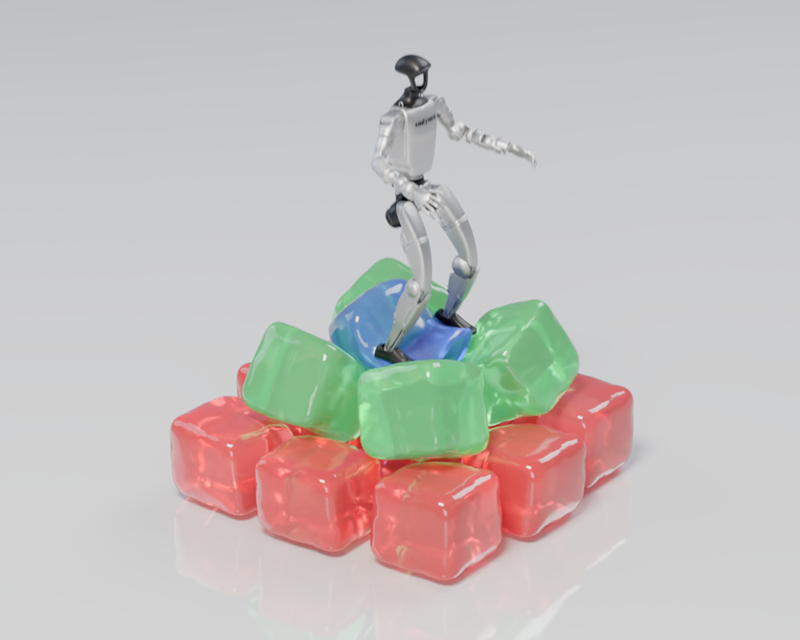
G1 falls onto separate FEM jelly blocks, demonstrating robot contact with tetrahedral soft bodies.
uv run python demos/g1_jelly_drop/demo_g1_jelly_drop.py
uv run python demos/g1_jelly_drop/demo_g1_jelly_drop.py --viewer null --num-frames 120 --test
A short run checks startup; it does not validate the entire trajectory.
Inspect --help for current defaults of --jelly-mu, --jelly-lambda, --jelly-damping, and --substeps.
Rendering materials do not change physical parameters. Export again after changing elasticity or damping.
The repository's demos/g1_jelly_drop/README.md describes USD, Blender, validation, and output paths.
Piper Bag Transport
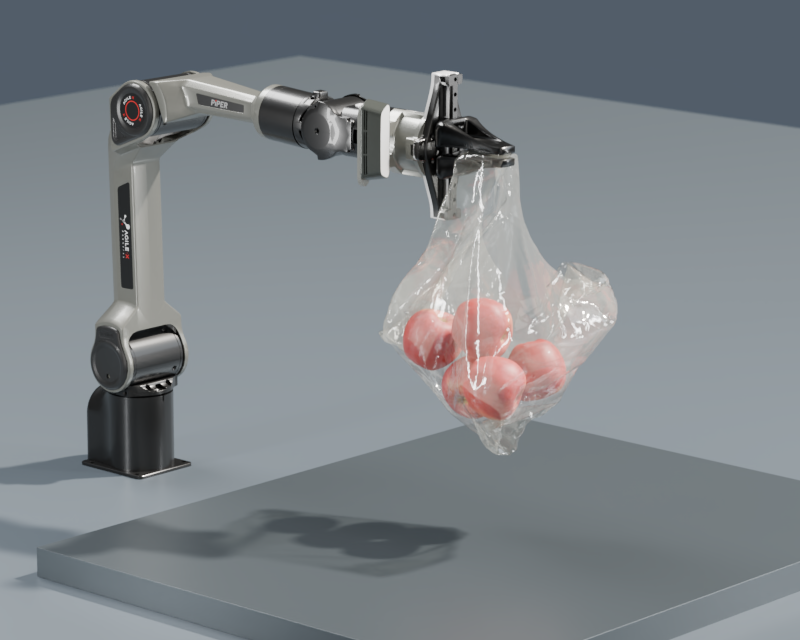
A robot arm grasps a soft bag, lifts and swings the apples inside, then returns the bag to the table. Bag contacts, cloth deformation, robot motion, and apple motion are exported from solved states. Offline rendering consumes those caches.
uv run python demos/piper_bag_transport/demo_piper_bag_transport.py
uv run python demos/piper_bag_transport/workflow.py --help
Example full offline workflow on Windows:
$blenderExe = 'C:/Program Files/Blender Foundation/Blender 5.2/blender.exe'
uv run python demos/piper_bag_transport/workflow.py --blender "$blenderExe" --draft --output-dir build/piper-preview
Replace the Blender path with your installed executable.
The workflow exports, validates, generates telemetry, builds the scene, renders, and encodes in sequence.
It stops if assets or external tools are missing.
See demos/piper_bag_transport/README.md in the repository for details.
Real-Time Viewing and Offline Rendering
| Stage | Requirements | Output |
|---|---|---|
| Simulation | CUDA, model, extension, credentials | Solved states |
| USD export | Simulation and USD Python support | Time-sampled geometry/pose caches |
| Blender scene build | Blender with USD import | Editable .blend project |
| Offline rendering / encoding | Cycles and encoding tools | Image frames and video |
After changing physics source or parameters, export again and validate that caches match the current source before rendering.
Editing .blend appearance does not update the physical trajectory.
Keep generated caches, videos, and logs in demo output directories rather than public documentation assets.
Optional Locomotion Workflow
This workflow requires additional packages and runs independently of documentation CI:
uv sync --extra locomotion
uv run --extra locomotion python -m examples.locomotion.validate --robot all
uv run --extra locomotion python -m examples.locomotion.train --robot go2 --num-envs 2048 --run
Training may only validate configuration by default; add --run to start it.
Begin with fewer parallel environments to check GPU memory, then scale following the training documentation.